According to Amazon, variations, also known as parent-child relationships, allow different product options to be displayed under a single listing. These products share similarities but differ in attributes such as size, color, or flavor.
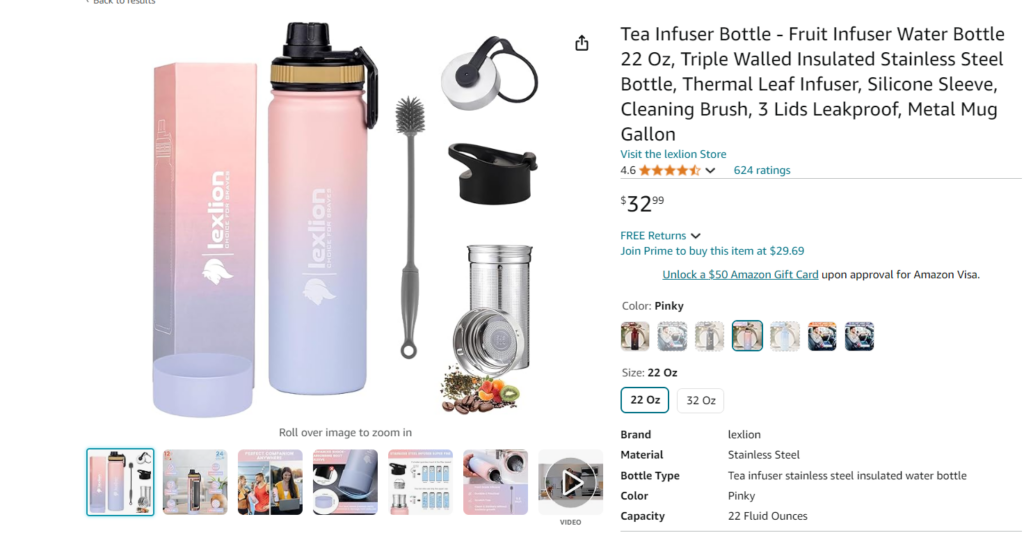
For instance, rather than creating 7 separate listings for infuser bottles available in various colors, a seller can group these options on a single product detail page. In this case, multiple ASINs are used to represent different color choices, all within the same listing.
Amazon views this approach as effective, especially for products that vary by size and color, as it creates cohesive variation families. This strategy not only enhances the shopping experience by simplifying product selection but also improves the organization and visibility of related products.
An Amazon listing variation is composed of three main components:
1. Parent Listing The parent listing, also known as the parent ASIN, acts as a container for the child’s products or variants. It is not a purchasable item itself but serves as a link connecting the related products. For example, if two t-shirts share the same parent, they are considered child products.
2. Child ASINs Child ASINs are the actual purchasable variants under the parent listing. A single-parent ASIN can have multiple child products, each distinguished by different attributes like color, size, shape, flavor, and so on.
3. Variation Theme The variation theme defines the attribute that differentiates the related products within a listing. This theme varies depending on the product category. For example, in the makeup category, child products might differ in size, shade, or color, while in the fashion category, variations could include color and size. In some categories, you can apply two variation themes, such as “SizeName-ColorName” for t-shirts that vary by both size and color.
Examples:
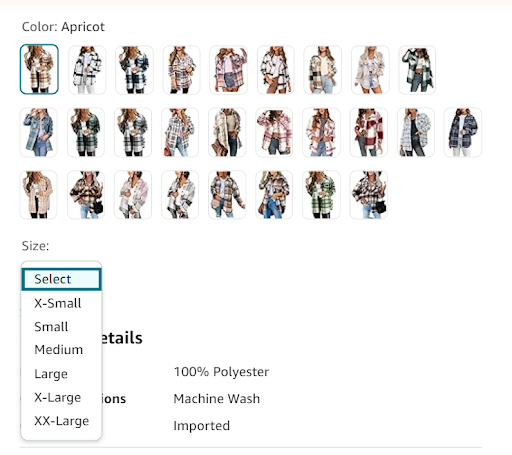
This setup allows customers to choose their preferred size and color without searching through multiple listings.
Implementing variation listings on Amazon offers several advantages, particularly for enhancing your product’s search visibility and conversion rates. Here are some of the key benefits:
1. Boosts Conversions One of the most significant benefits of using variation listings is the convenience it offers to shoppers. Customers can explore multiple options, whether it’s different sizes, colors, or flavors, within a single listing, reducing the need to browse through crowded search results. This streamlined experience often leads to higher conversion rates and increased revenue.
2. Increases Child Listing Visibility. Combining lower-performing or newly added products with established, higher-performing listings can significantly improve their visibility. For instance, instead of creating a separate listing for a new lipstick shade, you can add it as a variation to an already successful lipstick listing. This approach leverages the existing product reviews, which are crucial as 95% of shoppers read reviews before making a purchase. Positive reviews for the parent listing can instill confidence in the child’s ASINs as well.
Before creating a parent-child listing on Amazon, verify that your product category allows for variations. Categories commonly permitting variations include:
Once confirmed, the process of creating a variation listing is straightforward, especially if you are a registered Amazon seller. Below are the steps for setting up variations using Amazon’s inventory file template:
Step 1: Log in to Your Amazon Seller Central Account
Step 2: Fill in the Important Details
Step 3: Upload the Right Inventory File
If you want to add variations to an existing listing, follow these steps:
1. Download the Appropriate Category Template
Use the Product Classifier or Templates for Specific Categories to download the template. Review the ‘Valid Values’ tab to understand available variation themes.
2. Create Parent and Child SKUs
For the parent item, fill in the necessary sections, including the SKU, and leave the ‘Parent SKU’ column empty. Mark the ‘Parentage’ as “parent,” set an appropriate ‘Variation Theme,’ and leave ‘Relationship Type’ empty.
For each child item, fill in the required sections, link the ‘Parent SKU’ with the parent’s SKU, mark ‘Parentage’ as “child,” and set the ‘Relationship Type’ as “Variation.”
After completing the template, upload it to your Seller Central account.
Now that you understand the benefits of parent-child listings, here are some tips to maximize sales:
1. Highlight the Best Product as Your Main Listing
First and foremost, ensure that your primary product is appealing enough to attract clicks. This will not only grab attention but also encourage customers to explore related child listings. As a result, you can increase overall engagement and sales potential.
2. Utilize A+ Content
In addition, Amazon states that A+ Content can boost sales by 3–10%. This is because it provides customers with detailed product information. Consequently, customers feel more confident in their purchase decisions, which leads to higher satisfaction and improved conversion rates.
3. Include High-Quality Product Images
Moreover, clear and high-resolution images are crucial for converting potential buyers. Not only do they showcase your product effectively, but they also help build trust with customers. Therefore, investing in quality visuals can significantly impact your sales performance.
4. Leverage Amazon Keyword Tools
Furthermore, using Amazon keyword tools helps you find relevant keywords that enhance your product’s visibility. By doing so, you can improve your search rankings and attract more targeted traffic. In turn, this increases the chances of conversions.
5. Monitor and Manage Listing Quality
Finally, regularly assess your listing’s performance to ensure it remains desirable and easily discoverable. Additionally, consistent monitoring allows you to identify areas for improvement. As a result, you can optimize your listing and maintain a competitive edge.
Amazon currently allows up to 15,000 child ASINs to be displayed on a single product detail page, offering vast possibilities for product variations. However, with Amazon’s varying rules and regulations across different product categories, it’s crucial to understand the specific processes involved in selecting the most suitable category for your product variations.
For Amazon sellers, leveraging variation listings is a strategic advantage. These listings enhance the shopping experience by offering multiple options on a single product page, making it easier for customers to find exactly what they’re looking for. This not only boosts customer satisfaction but also drives higher sales, delivers a stronger ROI, and improves organic rankings in Amazon’s search results.
At SIPRANSH ECOMMGROWTH, we are Amazon Listing experts help you through the process of creating and optimizing Amazon listings. By following the steps outlined above and utilizing advanced Amazon intelligence tools, you can create your first listing variation today. You’ll soon see how these strategies can elevate your Amazon SEO efforts and contribute to the growth of your e-commerce business.
So, why wait? Start optimizing your Amazon listings with SIPRANSH ECOMMGROWTH, and watch your sales and visibility soar on Amazon.