
A decade ago, when we first began selling on Amazon, Amazon listing optimization was a very different game. Back then, success often meant stuffing product titles with as many keywords as possible. Moreover, Amazon sellers crammed titles with keywords in an attempt to boost visibility, even if it made them hard to read and less appealing to shoppers.
Just picture a title like this.
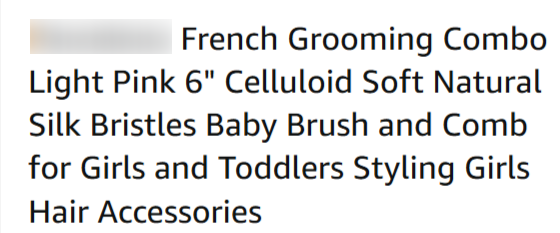
It’s overloaded with keywords, making it confusing, unattractive, and difficult for buyers to quickly understand the product.
Fast forward ten years, and things have taken a turn. Amazon has significantly updated its guidelines, and importantly, the focus is now more on clarity and user experience. Keyword stuffing is now frowned upon.
Yet despite these updates, many Amazon sellers still default to overly long, keyword-heavy titles simply out of habit. Consequently, this ongoing practice has led to a major debate in the Amazon community: Do longer titles still work, or are shorter, cleaner ones more effective? In today’s blog post, we’re putting this debate to rest once and for all. Therefore, keep reading to discover the truth!
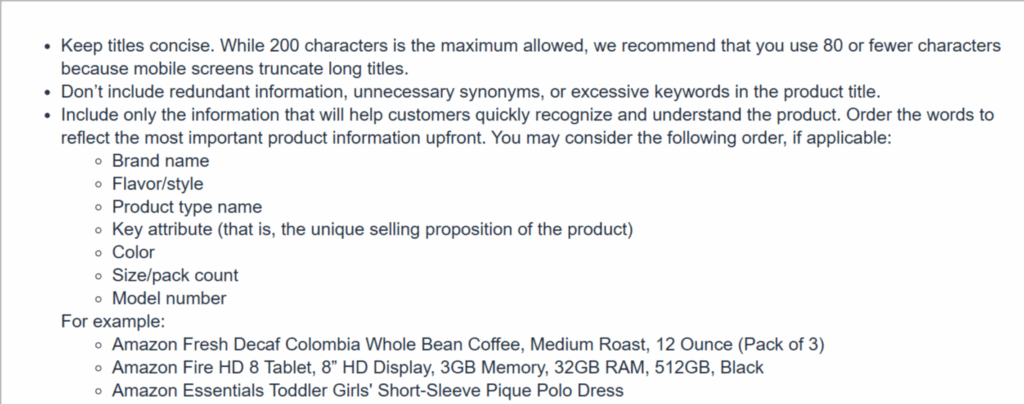
Amazon has always been a bit elusive when it comes to setting crystal-clear rules for product title lengths. Technically, the platform allows up to 200 characters; however, anything over 150 characters could trigger warnings in your “Listing Quality Dashboard.”
To add to the confusion, Amazon’s own seller resources often recommend keeping titles close to 60 characters. With all this conflicting information, it’s clear that strictly following Amazon’s guidance won’t always give you a definitive direction.
So…who wins, shorter titles or longer titles?
Let’s break this down.
Short titles are easier to scan and understand quickly, which makes them more appealing to shoppers. Additionally, they tend to perform well in terms of click-through rate (CTR), which means more people end up visiting your Amazon listing, and those visits often convert into sales.
On the flip side, longer titles give you more room to incorporate keywords. As a result, more keywords mean more chances to show up in relevant search results, which can result in more visibility and impressions on Amazon.
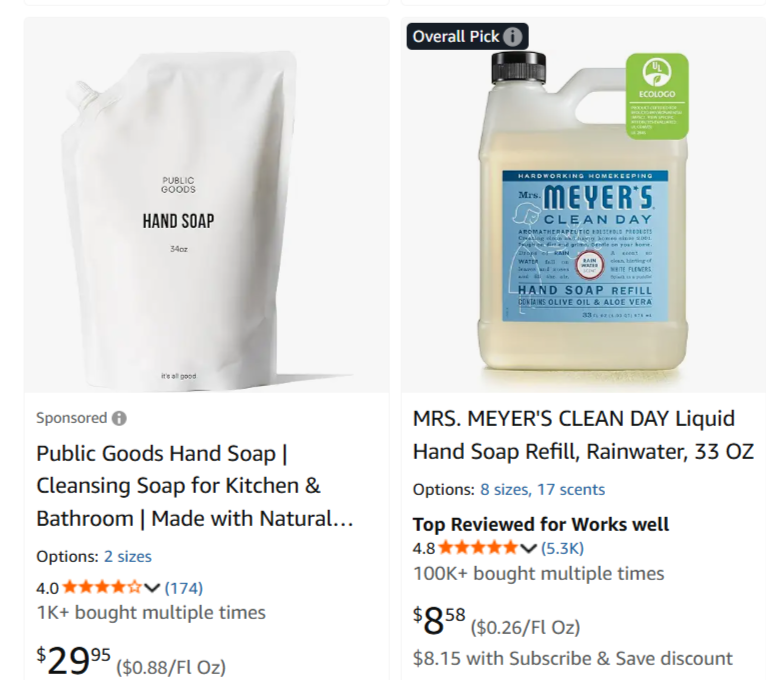
Here’s the tradeoff: shorter titles may lead to better conversions, while longer ones might bring in more traffic. Ultimately, it really comes down to your main goal. If you’re after high visibility, a longer title might be the better option. But if you’re aiming for better conversions from fewer clicks, then shorter and more focused titles could serve you better.
Still, many sellers on Amazon don’t want to choose between the short title vs long titles, and fortunately, they don’t have to. Here’s a strategy that blends both benefits.
Read More: What happens if your product titles don’t comply?
When launching a new product on Amazon, start with a longer title – something in the range of 150 to 170 characters. This gives you a boost in search exposure by including more relevant keywords. Consequently, it helps generate early traction, which is critical for new listings.
Once your Amazon listing gains some traction and has built up visibility, switch to a shorter version of the title. This updated, more concise title will appeal more to users who are ready to make a purchase, helping you improve your conversion rate.
There’s a lot of debate in the seller community about the ideal title length. Some recommend 60 characters to keep titles mobile-friendly. Others suggest 80 characters based on Amazon’s best practices. Meanwhile, some support going up to 150 characters, a range often promoted by experienced Amazon listing optimization agencies. And yes, the 200-character limit technically exists, too.
The reality? There’s no universal answer. Every product and category is different. Therefore, the best title length for your product depends on a variety of factors, including your niche, competition, and brand recognition.
At our marketing agency, we’ve found that aiming for a title length between 120 and 150 characters often delivers the best results. This range allows for relevant keyword integration while keeping titles readable and appealing on Amazon.
One important tactic we use is to front-load the most critical information within the first 60 characters. This ensures that essential details are visible even on mobile devices, where screen space is limited. It’s all about making a strong first impression.
Well-known brands with established visibility can afford to use shorter titles without hurting performance. However, newer or lesser-known Amazon sellers can benefit from utilizing more of the character count to capture additional keywords and boost visibility.
Ultimately, there’s no one-size-fits-all formula. Even advice from Amazon itself can sometimes be too broad. The smartest approach? Test different title lengths, monitor performance, and focus on what works best for your unique product and audience.
Experiment with different title styles—maybe one that’s short and direct, like “Compact 12-Cup Coffee Maker,” and another that’s more descriptive, such as “12-Cup Programmable Coffee Machine – Perfect Brew Every Morning.” Moreover, tools like Amazon’s Manage Your Experiments allow you to run A/B tests to compare which title brings in better engagement and conversions.
Study how similar products are being listed on Amazon. Are top-ranking Amazon sellers using concise titles, or are they loading in more detail? Observing competitors can provide valuable insight into what might work in your niche. Just be sure to adapt their tactics to fit your own brand and product—don’t copy blindly.
Use performance metrics from your title tests to determine what works best. If a shorter title delivers higher click-through rates, stick with it. Conversely, if a longer, keyword-rich version attracts more traffic and sales, that’s your sign to lean into it.
It might seem smart to cram every relevant keyword into your title, but Amazon’s algorithm and your customers will notice. Overloading a title like “Coffee Maker Machine Programmable Auto Coffee Brewer” not only looks messy but can hurt readability. Instead, go for natural language, like “12-Cup Programmable Coffee Maker – User-Friendly & Easy to Clean.” It’s clear, informative, and more inviting to shoppers.
Read More: Amazon’s Two-Part Product Title Format
Keep in mind that Amazon’s 200-character limit gives you room to work with, so make every character count. Try out various title lengths, watch what your competitors are doing, and be flexible enough to adjust based on what the data shows.
Need a hand refining your Amazon listings? The Amazon expert consultants at Sipransh Ecommgrowth are ready to assist. Contact us today, and let’s work together to elevate your success on Amazon!